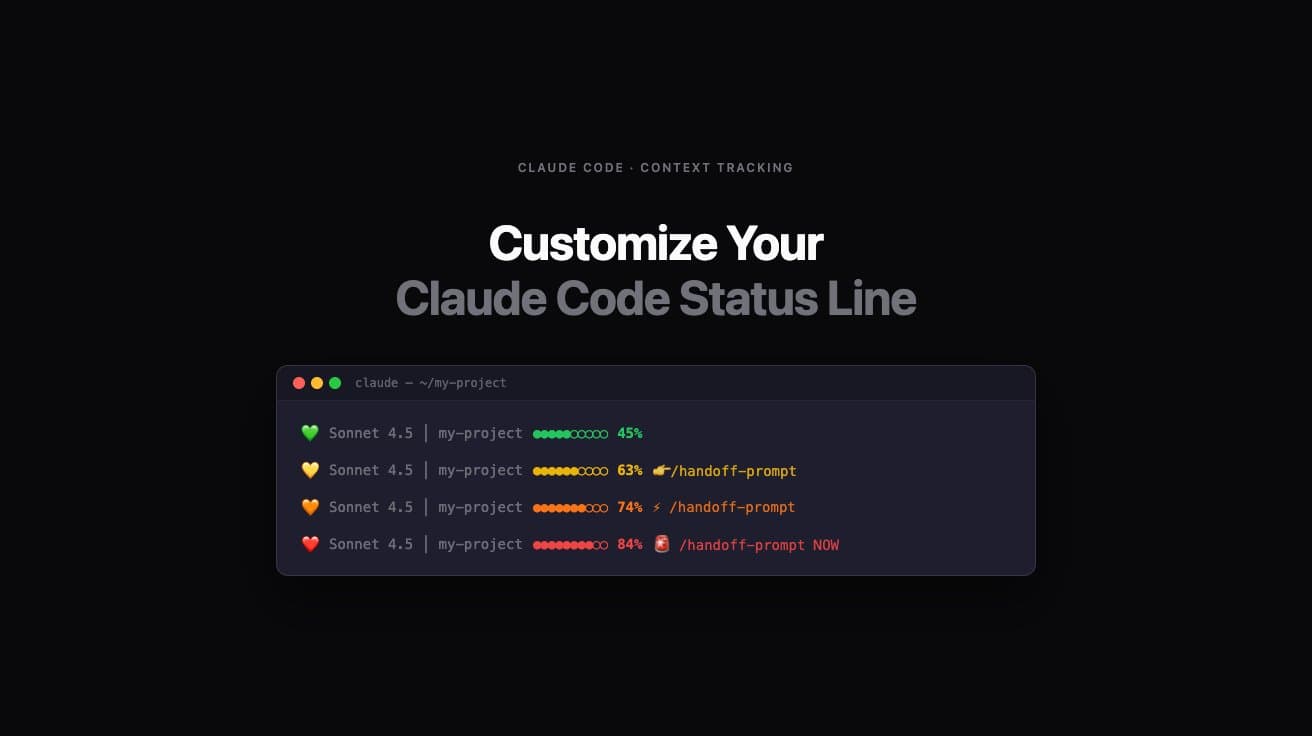
Customize Your Claude Code Status Line
Get better context tracking before Claude Code degrades
These statuslines use Claude Code's real-time context_window API (2.1.72+) to display accurate token usage instantly — no parsing delays, no guessing. For older versions (2.0.27–2.1.71), the statuslines automatically fall back to transcript parsing. Works great alongside OpenClaw Clawdbot's /handoff-prompt command.
Version 3.0 — March 10, 2026
Improve your long coding sessions by creating a fun customized context status line that reflects your personality. Pick from one of our themes, or build your own custom status line.
Verify before you run
AI coding agents like Claude Code have full access to your filesystem and can execute shell commands. Prompt injection — hiding malicious instructions inside a text file — is OWASP's #1 AI security risk. We're confident this prompt is clean, but you should verify it yourself. It takes 30 seconds.
Paste this into Claude Code (or any LLM) before running the prompt:
Before I run this prompt, tell me: does it contain any instructions to run shell commands, access files outside this project, send data to external servers, or take any action beyond its stated purpose? List anything suspicious, or confirm it's clean.
A clean prompt gets a clean answer. If anything looks off, don't run it — reach out to us.
10 Themes — Pick One, Copy One Command
Open Claude Code. Paste the command. Done. Your statusline appears at the bottom of the terminal after the next interaction.
Check the box above to enable all Copy Command buttons.
Performance Optimized
RECOMMENDEDResearch-backed thresholds. Full implementation spec. Warnings link to the 8-section handoff methodology.
Minimalist Clean
Distraction-free. Color only at critical thresholds. Numbers only. Philosophy: show me what I need, when I need it.
Hacker/Terminal
Matrix-style green. Dim as context fills. Bold red alerts. Pure terminal energy. You're in the Matrix.
Emoji Heavy
Visual, expressive, fun. Status emoji changes with each zone. Circle bar with color.
Productivity Focus
Clear action words. Cyan productive zone. Gradient bar. Escalating urgency to STOP.
Traffic Light
Red, yellow, green. Universal. Zero learning curve. GO → SLOW DOWN → STOP.
Battery Indicator
Context as battery charge. Battery icon changes as you drain it. Everyone knows the low-battery feeling.
Developer Debug Mode
Exact token counts. Decimal precision. Session time. Every number exposed. Show me everything.
Calm & Aesthetic
Soft pastels. Diamond bar. Gentle reminders. Zen coding environment. No stress, just awareness.
Speedrun/Gaming
HP hearts that RUN OUT as context fills. XP levels. Boss fight alerts. Your coding session is a speedrun.
Custom Status Line Generator
Prefer to roll your own? Customize colors, messages, icons, and bar style. Live preview included.
Load a preset
Live preview
Customize
Display
Progress bar
Colors
Warning messages
Icons / emojis
Generated command
Why 60–70%, not 100%? The science behind context degradation
Claude Code's context window holds everything — your instructions, the conversation history, every file it's read, every response it's given. As that window fills, older context gets deprioritized. The model still responds, but the quality of those responses quietly degrades.
With real-time data (2.1.72+), these thresholds are now instantly actionable. Previously, the statusline showed state “one message behind” — you might see green “SAFE” while already at 74% warning territory. Real-time mode eliminates that lag entirely, making the thresholds meaningful in the moment.
The research-backed thresholds these themes use:
Peak quality. Work freely.
Quality still good, but this is the ideal time to handoff for complex tasks.
Responses getting vaguer. Start your handoff now.
Immediate action needed. Quality suffering.
Claude Code compresses context automatically (160,000–170,000 tokens). The statusline uses the exceeds_200k_tokens flag as the authoritative signal — when compaction starts, it shows 100%.
The best practice: use the 8-section handoff methodology at 60–70% to preserve context quality with a comprehensive continuation document. That's why every theme above links to dontsleeponai.com/handoff-prompt at the critical thresholds.
How to install a Claude Code statusline (5 steps)
Works in VS Code terminal, iTerm2, Terminal.app — any ANSI-capable terminal. Requires Claude Code CLI v2.0.27 or later.
Prerequisites
claude --versionbrew install jq · Linux: sudo apt install jqCheck your version
Run: claude --version — 2.1.72+ gets real-time mode. 2.0.27-2.1.71 gets fallback mode (still works, one message behind).
Upgrade for real-time mode (optional)
Run: npm install -g @anthropic-ai/claude-code@latest — takes ~30 seconds. Restart Claude Code after upgrading.
Copy a theme command
Pick a theme from the gallery below. Click "Copy Command" to copy the full /statusline prompt to your clipboard.
Paste into Claude Code and press Enter
Open Claude Code in any terminal. Paste the command and hit Enter. Claude Code generates the statusline script in about 5-10 seconds.
Verify which mode is active
Send your next message, then check: tail -3 /tmp/claude-statusline-calls.log — shows REALTIME: (2.1.72+) or FALLBACK: (older). Statusline appears at the bottom of the terminal.
Frequently asked questions
Why 60%, 70%, and 80% — why not 90% or 100%?
Research shows Claude Code context quality begins degrading at 60–70%, not near 100%. By 80%, responses are noticeably worse. Claude Code also triggers auto-compact at 85–90%. Using these thresholds gives you actionable warnings before degradation starts, not after.
What is /statusline?
Claude Code has a built-in /statusline command for configuring a custom status bar at the bottom of the Claude Code interface. You define what to display and how; Claude Code handles the rendering and updates it after every interaction.
Does this work in VS Code?
Yes. The statusline renders inside Claude Code's own interface, which works in VS Code's integrated terminal, iTerm2, Terminal.app, or any terminal that supports ANSI color codes.
Can I customize the thresholds?
Yes. Use the generator above to set your own thresholds, colors, and messages. Or copy any theme command and modify the text directly before pasting into Claude Code.
The statusline isn't appearing — what do I do?
First, restart your Claude Code terminal (exit and reopen). Still blank? Check that ~/.claude/settings.json has a statusLine section. Verify jq is installed by running jq --version. Check that the script is executable: chmod +x ~/.claude/statusline.sh. Then send one message to Claude Code to trigger the first update.
Statusline shows 0% or jumps around randomly?
On Claude Code 2.1.72+: this shouldn't happen — real-time data is always accurate. Check debug log (tail /tmp/claude-statusline-calls.log — should show REALTIME:) and verify claude --version. On Claude Code 2.0.27-2.1.71: you're seeing streaming artifacts. The statusline is reading partial messages with ~9 tokens. Fix: open ~/.claude/statusline.sh and update the section that reads assistant messages to filter by token count.
This filters out messages with < 1000 tokens (streaming artifacts) and only reads complete assistant responses. Save the file — takes effect on your next message. Confirmed on Claude Code v2.0.27+.
How do I know if my statusline is using real-time data?
Check your debug log: tail -5 /tmp/claude-statusline-calls.log — look for REALTIME: (you're on 2.1.72+ with real-time data) or FALLBACK: (you're on 2.0.27-2.1.71 using transcript parsing). To upgrade to real-time: npm install -g @anthropic-ai/claude-code@latest then start a fresh Claude Code session.
My statusline shows different numbers than /context — why?
Depends on your version. On 2.1.72+: should match /context perfectly — if not, check the debug log (should show REALTIME:) and verify your version with claude --version. On 2.0.27-2.1.71: shows one message behind during active conversation. This is expected — upgrade to 2.1.72+ for real-time accuracy.
Do I need to update my existing statusline script?
Yes, if you want real-time accuracy. Scripts from before March 2026 only have the fallback method. To update: verify claude --version is 2.1.72+, copy any theme command below, paste into Claude Code — it overwrites the old script automatically.
Statusline shows 92% but Claude Code says 'compacting'?
On Claude Code 2.1.72+: real-time mode handles this seamlessly via the exceeds_200k_tokens flag — if you're still seeing this, reinstall any theme below (copy command, paste into Claude Code). On Claude Code 2.0.27-2.1.71: this is a race condition — compaction starts before the transcript updates. Fix: add the exceeds_200k_tokens override to your script.
This uses Claude Code's own exceeds_200k_tokens flag as the authoritative signal. When Claude Code is compacting, your statusline will show 100% — always in sync.
How do I switch to a different theme?
Just run a new /statusline command from any theme above. It overwrites the previous one automatically — no manual cleanup needed.
How do I remove the statusline entirely?
Delete the statusLine section from ~/.claude/settings.json. That's it. No scripts to hunt down — Claude Code stops calling the script as soon as the setting is removed.
The statusline shows 0% — is that wrong?
No — this is normal for brand new sessions before any messages are sent. Send one message and the percentage updates immediately.
What is the handoff methodology linked in the warnings?
The 8-section continuation methodology at dontsleeponai.com/handoff-prompt. It structures your handoff so the next Claude Code session picks up exactly where this one left off — with no guessing, no re-explaining, no lost context.
Will this slow down my terminal?
No. The statusline runs after each Claude Code interaction, not in a continuous loop. It's triggered by Claude Code itself and adds negligible overhead.
Technical deep dive: real-time vs fallback
With real-time mode (2.1.72+), your script reads one field — no loops, no parsing, no lag:
With fallback mode, the script parses the transcript file, filters artifacts, extracts token counts, and calculates percentage manually — while potentially reading stale data.
| Feature | Real-Time (2.1.72+) | Fallback (2.0.27–2.1.71) |
|---|---|---|
| Accuracy | Matches /context perfectly | One message behind |
| Between messages | Current state | Last message state |
| Performance | No file I/O | Parses transcript |
| Lag | Zero | 1 message |
| Streaming artifacts | No filtering needed | Filter tokens > 1000 |
| Override handling | Seamless | Race condition possible |
| Recommended | ✅ Yes | ⚠️ Legacy support |
Ready to level up
These themes warn you WHEN to handoff.
Learn HOW to handoff with the 8-section continuation methodology at dontsleeponai.com/handoff-prompt. Your next session picks up exactly where this one left off.
Version History
The statusline themes evolve as we discover bugs and better implementation patterns.
Version 3.0Current
March 10, 2026
- •BREAKTHROUGH: Claude Code 2.1.72+ now provides real-time context data via context_window object
- •All 10 themes updated with dual-mode version detection (real-time 2.1.72+ + fallback 2.0.27+)
- •Real-time mode reads context_window.used_percentage directly — zero lag, matches /context exactly
- •Fallback mode retains transcript parsing for older versions (still works, one message behind)
- •Debug logging added to all themes — check /tmp/claude-statusline-calls.log to see which mode is active
- •Updated installation guide with version check step
- •Added migration guide for users upgrading from pre-March 2026 statuslines
- •Added technical deep dive: real-time vs fallback comparison table
- •New FAQ entries: how to verify which mode is active, mismatched /context numbers, upgrading scripts
Show previous versions (3)
Version 2.1
March 9, 2026
- •Fixed 0% / jumping bug — filter streaming artifacts (thinking blocks, tool_use) by token count > 1000
- •Fixed race condition — exceeds_200k_tokens flag override: shows 100% when compaction starts
- •Upgraded all themes to use tail -100 for reliable heavy tool-use sessions
- •Added EXCEEDS LIMIT OVERRIDE and IMPLEMENTATION NOTES to all 10 theme commands
- •Updated FAQ: replaced tail -50 fix with token-filter fix
- •New FAQ: 'Statusline shows 92% but Claude Code says compacting?' — explains race condition + fix
- •Updated 85%+ research row to reference exceeds_200k_tokens flag
Version 2.0
March 9, 2026
- •All 10 theme commands rewritten with full implementation specs
- •Added exact ANSI escape codes to every theme
- •Added token extraction formula: ((tokens / 200000) * 100 / 80) * 100
- •Gaming theme: exact heart logic (70% ❤️, 30% 💔, dead = 🖤)
- •New installation guide with prerequisites (Claude Code v2.0.27+, jq, ANSI terminal)
- •Expanded troubleshooting FAQ (4 new entries)
- •Added tail -50 fix for heavy tool-use sessions (superseded by v2.1)
Version 1.0
March 9, 2026
- •Initial release — 10 copy-paste statusline themes
- •Live generator with preset loading and URL sharing
- •Research section: 60/70/80% context degradation thresholds
- •HowTo schema markup for installation steps
- •FAQPage schema markup
Every day is magic. We are the prospectors of 1849 and there is gold in them hills. Be the one who prospects it.
Don't sleep on AI.
© DontSleepOnAI.com — All rights reserved.
Start here
OpenClaw + OpenAI Codex ChatGPT Setup
If your bots are breaking during the Claude-to-Codex transition, this is the first page to read. It covers the install walkthrough, the migration prompt, and the safer one-bot-at-a-time path.
Keep exploring
More free AI tools and guides from Don't Sleep On AI

AI Handoff Prompt
The free 8-section template that lets you pick up exactly where you left off — no re-explaining, no lost context.

AI Slash Command Builder
Build a custom /slash command that gives Claude Code full project context in one shot. Never repeat yourself again.

Claw Memory Fix
Bloated memory files silently degrade your AI. One command audits, prunes, and restructures everything — without losing what matters.